
Cloud
Cloud Computing Roadmap: AWS or Azure, Projects and Skills Checklist
Choose an AWS or Azure learning path, build three practical cloud projects, validate networking and access, and use a downloadable skills and cleanup checklist.
A practical cloud computing roadmap starts with networking and operating systems, then adds identity, one cloud platform, monitoring, recovery and repeatable deployment. Choose AWS or Azure first, build small projects with observable results, and expand after you can explain and troubleshoot what you deployed. Studying both platforms at once is optional; collecting certificates is not a substitute for those skills.
This guide is for beginners and support, networking or system-administration professionals moving into cloud work. The exercises are learning proposals for an isolated lab account or subscription. They are not a claim that Network Kings executed these specific projects or independently reviewed this article’s technical steps.
Should you learn AWS or Azure first?
Start with the platform used in your workplace, target role or chosen training environment. If you have no preference, compare several relevant job descriptions and note the tasks and services they ask for. A useful choice creates a place to practise; it does not require a universal winner.
| Your starting point | Useful first focus | Evidence to build |
|---|---|---|
| New to infrastructure | IP addressing, DNS, Linux or Windows, cloud concepts | Explain a client-to-server request and diagnose a local connectivity fault. |
| Network or systems support | One platform’s identity, virtual networks and compute | Deploy a small environment and separate routing, filtering and permission failures. |
| Interested in architecture | Requirements, availability, security and cost tradeoffs | Compare two designs and justify a choice. |
| Interested in administration | Resource lifecycle, access, monitoring and recovery | Operate a workload, investigate an alert and test recovery. |
For certification planning, AWS Solutions Architect Associate currently uses SAA-C03 and targets candidates with at least one year of hands-on AWS design experience. Azure Administrator Associate uses AZ-104; its current study outline is effective from 17 April 2026. They validate different responsibilities, so compare the AWS exam guide and Microsoft study guide against your goal.
The roadmap: foundations to practical projects
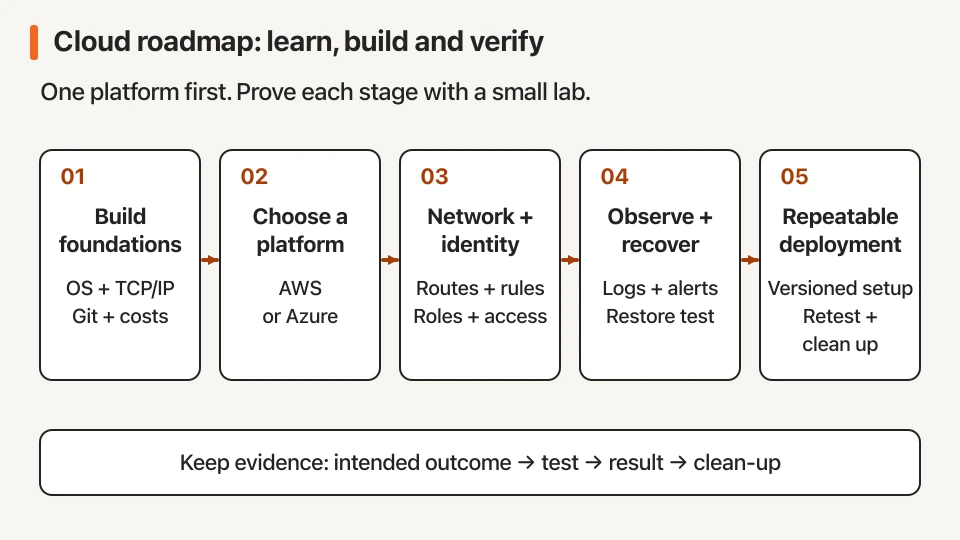
- Understand a request: trace DNS resolution, an IP route, the transport connection and the application response. Practise subnetting and basic command-line navigation.
- Control access and spending: identify your account/subscription, region, permissions and cleanup scope before provisioning resources.
- Build a network: define address ranges, subnets, routes and filtering. Explain which paths exist and which do not.
- Operate compute and storage: connect safely, inspect logs and permissions, and test a small workload.
- Make the work repeatable: use Git and infrastructure templates, preview changes, and test recovery.
Use these as progress gates rather than fixed weekly promises. Someone already administering servers may move through operating-system work quickly while needing more time on identity policies. A beginner may need the reverse. Advance when you can produce and explain the evidence.
The CCNA syllabus and branch-network exercise provide a practical starting point for addressing, VLANs and routing.
Before provisioning: establish the lab boundary
Use a dedicated training scope with no production workloads. Confirm the active identity and account before every deployment. Prefer temporary credentials and roles, enable MFA, and grant the permissions needed for the exercise; follow AWS’s identity best practices when using AWS.
Check current service pricing, choose a spending limit you can afford, and configure available budget alerts. Alerts are not a hard cap: AWS documents billing and notification delays, while Microsoft states that budgets do not stop consumption. Write the cleanup plan before adding VMs, public IPs, gateways or other billable services.
Project 1: create a network and prove its configuration
Plan 10.20.0.0/16 with subnets 10.20.10.0/24 and 10.20.20.0/24. They fit inside the parent range and do not overlap. Record their purpose in an address table. Begin without VMs or NAT gateways so the exercise focuses on the network configuration.
AWS exercise: subnet and route-table associations
- In the VPC console, create a VPC named
nk-roadmap-labwith the parent range. Use the VPC-only option rather than a wizard that adds services you did not plan. - Create the two subnets. Record their IDs and Availability Zones.
- Create two route tables and explicitly associate one with each subnet. Inspect the local route.
- Create and attach an internet gateway. Add
0.0.0.0/0pointing to it in the first subnet’s table only. - Reopen both subnet associations and route tables. Save the exact destinations and targets.
An internet-gateway route makes the first subnet public in AWS terminology. It does not make every future workload reachable: addressing and security rules also matter. The second subnet has no direct internet-gateway route. Do not add NAT merely to complete a diagram. IPv4 0.0.0.0/0 and IPv6 ::/0 are separate routes. See AWS route-table documentation and internet-gateway behavior.
Azure exercise: create and inspect a VNet
In an authorized Azure lab subscription, the following CLI example creates a dedicated resource group and two subnets. Check the active subscription with az account show first. Substitute a permitted region if needed.
az group create --name nk-roadmap-lab --location eastus
az network vnet create --resource-group nk-roadmap-lab \
  --name nk-vnet --address-prefixes 10.20.0.0/16 \
  --subnet-name workloads-a --subnet-prefixes 10.20.10.0/24
az network vnet subnet create --resource-group nk-roadmap-lab \
  --vnet-name nk-vnet --name workloads-b \
  --address-prefixes 10.20.20.0/24
az network vnet subnet list --resource-group nk-roadmap-lab \
  --vnet-name nk-vnet \
  --query "[].{Subnet:name,Prefix:addressPrefix,DefaultOutbound:defaultOutboundAccess}" \
  --output table
Inspect the actual defaultOutboundAccess property and any attached network security groups. Do not transfer AWS’s public-subnet definition directly to Azure. New VNets deployed with the API version released after 31 March 2026 default to private subnets needing explicit outbound connectivity for public endpoints. Earlier API versions retain earlier defaults, and existing VNets are unchanged. Azure's portal already defaults to private subnets. Verify deployment behavior against Microsoft’s scope and transition guidance.
Validation: save the address plan, actual subnet ranges, associations and routes. Explain the expected path for a destination inside the network and one on the internet. Without a workload and packet tests, this proves configuration—not end-to-end connectivity. Use Microsoft’s VNet management reference to inspect or adjust the Azure configuration.
Project 2: test compute, access and troubleshooting
Add a small VM through a guided lab after checking its costs and management requirements. Choose a private-management method supported by that environment; configure its required identity and connectivity instead of opening remote administration to the whole internet. Microsoft’s two-VM VNet quickstart is one documented path, with Bastion and cleanup steps.
For a tiny web-server exercise, document the intended source, destination and TCP port. Confirm the service listens locally, test the allowed path, then remove one relevant allow rule and retest. Restore it and repeat. Keep the change isolated from your management connection.
| Observation | Next investigation |
|---|---|
| Name fails, known IP works | DNS settings, record and resolver path. |
| Service fails even locally | Process, listening address, port and application logs. |
| Local service works, remote request times out | Routing, filtering and return path; a timeout alone is not proof of one cause. |
| Cloud API returns access denied | Active identity, action, resource scope and policy evaluation. |
Validation: retain the test command, result, relevant log, one fault and the successful retest. Remove account IDs and other sensitive details before making a portfolio public.
Project 3: repeat deployment and test recovery
Represent the small network in CloudFormation, Bicep or Terraform. Keep the template in Git without credentials. Validate it, inspect a change preview, and deploy into the dedicated lab scope. Change one harmless property, preview the difference, apply it, and compare the resulting resource state with the template.
For recovery practice, create a small test file or dataset, make a backup using the chosen service’s documented procedure, and restore it to a separate test target. Compare its contents and record the elapsed time. Enabling backup proves a setting; a successful restore tests whether you can recover useful data.
Validation: a second deployment, an explained change, and a verified restore. Your README should describe requirements, architecture, deployment, tests, costs, limitations and teardown. Keep claims proportional to what you actually tested.
Cloud learning and project checklist
Use this list on-page or download the matching text checklist.
- Choose one starting platform and explain how it fits my learning or role goal.
- Confirm the lab account or subscription, active identity, region and permissions.
- Check service pricing, configure available budget alerts and write a cleanup plan.
- Record non-overlapping network and subnet ranges.
- Inspect actual routes, associations, filtering and outbound-connectivity settings.
- Separate configuration evidence from tested packet connectivity.
- Test an allowed path, introduce one isolated fault and prove the repair.
- Commit a credential-free template and inspect changes before deployment.
- Restore test data and verify its contents.
- Remove lab resources, inspect leftovers and review subsequent billing.
In AWS, remove the lab workloads and billable dependencies, then follow the VPC deletion procedure. Check for leftover volumes, snapshots, public IPs, NAT gateways and endpoints. In Azure, confirm the active subscription and inspect az resource list --resource-group nk-roadmap-lab --output table. Only for this disposable group, run az group delete --name nk-roadmap-lab and confirm the prompt. When deletion finishes, az group exists --name nk-roadmap-lab should return false. Check outside the group for backups or other resources and review subsequent billing. Stopping a VM alone is not teardown.
For guided learning, compare AWS Associate and Azure AZ-104, or explore the AWS Cloud Security and Azure Cloud Security programmes. Practise through AWS labs or Azure labs; confirm current inclusions and access before enrolling.
Compare current learning plans or request career guidance for your starting point.
Sources and editorial note
Vendor information checked on 16 October 2026. By Network Kings. Editorial revision prepared with AI assistance; no independent technical review recorded.