
Microsoft Azure Fundamentals 2026 Guide for Beginners
Learn Microsoft Azure Fundamentals in 2026, including core services, cloud concepts, AZ-900, and a practical learning path for beginners.
Cloud computing has become a core part of modern IT, and Microsoft Azure is one of the major platforms businesses use to build, run, and manage applications and infrastructure. If you are completely new to cloud technology, Microsoft Azure Fundamentals 2026 offers a practical starting point without requiring advanced programming or cloud experience.
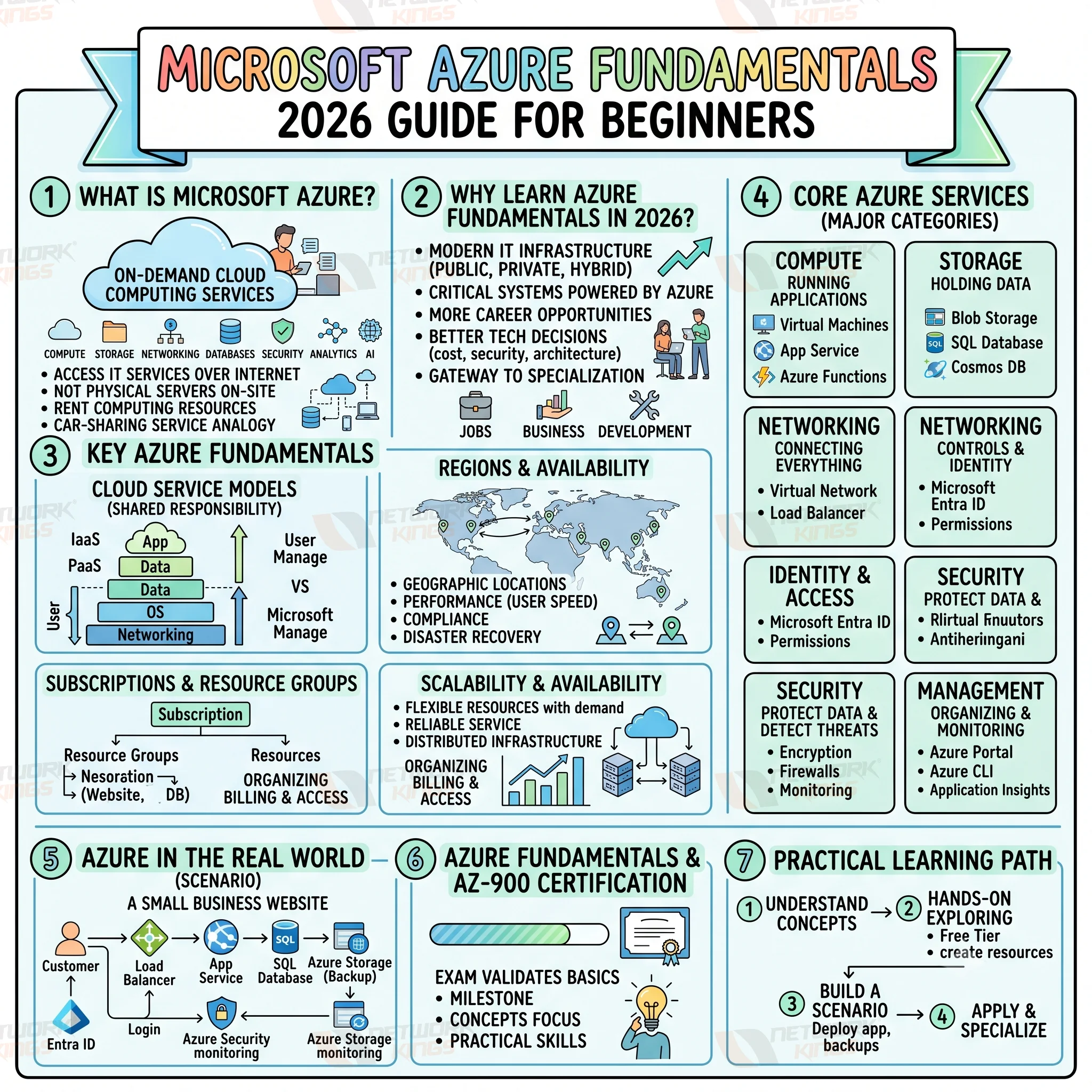
Microsoft Azure is a cloud computing platform that provides on-demand services for computing, storage, networking, databases, security, analytics, AI, and application development. Instead of buying and maintaining every physical server and networking device, organizations can use Azure resources as needed and scale them as requirements change.
What Is Microsoft Azure
Microsoft Azure is a cloud computing platform that lets organizations access computing power, storage, databases, and other IT services over the internet instead of maintaining physical servers on-site. Rather than buying expensive hardware and managing it yourself, you rent computing resources from Microsoft's data centers distributed around the world. Think of it like the difference between owning a car and using a car-sharing service: you get the capability you need without the overhead of ownership.
Azure offers a vast catalog of services, but beginners don't need to memorize everything. The fundamentals focus on understanding how cloud computing works, what types of services Azure provides, and how these services connect together to solve real business problems.
Why Learn Azure Fundamentals in 2026
Cloud computing has become a major part of modern IT infrastructure, with many organizations using public cloud, private cloud, or hybrid environments. Companies aren't asking whether they'll use cloud services anymore; they're asking which cloud provider makes the most sense for their needs. Azure powers critical systems for businesses of all sizes, from startups to enterprises, and professionals who understand cloud fundamentals have access to more career opportunities and can contribute to more projects.
Beyond career considerations, understanding Azure fundamentals makes you a better technology professional regardless of your role. If you work in IT, development, operations, security, or business technology, knowing how cloud infrastructure functions changes how you approach problems. You'll understand cost trade-offs, security implications, and why certain architectural decisions matter.
Learning fundamentals also prepares you for specialization. Whether you eventually focus on Azure security, data engineering, application development, or cloud architecture, you'll have the baseline knowledge that makes advanced topics click.
Key Azure Fundamentals Beginners Should Understand
Several core concepts appear throughout everything you'll do with Azure. Getting these right early saves confusion later.
Cloud service models describe how responsibility is divided between you and Microsoft. Infrastructure as a Service (IaaS) means you manage applications and data while Microsoft handles servers and networking. Platform as a Service (PaaS) lets you focus on applications while Microsoft handles more of the infrastructure. Software as a Service (SaaS) gives you complete applications like Microsoft 365, and Microsoft manages everything underneath. Most Azure fundamentals work center on IaaS and PaaS, though it's worth understanding all three.
Regions and availability matter because your data and applications live in specific geographic locations. Azure operates data centers in regions across the globe. When you deploy resources, you choose which region. This affects performance (users closer to your data experience faster speeds), compliance (some data must stay in specific countries), and disaster recovery (having resources in multiple regions protects against outages).
Subscriptions are how you organize billing and access. Your Azure subscription is like an account with Microsoft; everything you create gets associated with a subscription and charged to it. Many organizations have multiple subscriptions to separate departments, projects, or billing.
Resource groups are organizational containers. You put related Azure resources into a resource group, which makes management simpler. If you're running a website, you might have one resource group containing your web server, database, and storage account. Resource groups don't affect how services work; they're purely organizational.
Scalability and availability are promises Azure makes. Scalability means you can add or remove resources to match demand. If your application gets more traffic, you can add more servers. Availability refers to how reliably your services run. Azure's distributed infrastructure means if one data center has problems, your application keeps running elsewhere.
Core Azure Services Beginners Should Know
Azure offers hundreds of services, but beginners should focus on the major categories that appear in most real-world scenarios.
Compute services provide the processing power to run applications. Azure Virtual Machines let you rent server hardware and install software exactly as you would on a physical machine. App Service is simpler: you upload your web application code, and Azure handles the server details. Azure Functions let you run small pieces of code that respond to events without managing servers at all.
Storage services hold your data. Azure Blob Storage stores massive amounts of unstructured data like images, videos, or backups. Azure SQL Database provides traditional relational databases. Azure Cosmos DB handles database workloads that need extreme scale or real-time responsiveness.
Networking services connect everything. Azure Virtual Networks are like creating a private internet within Azure. You put your resources inside a network, and they communicate securely. A load balancer distributes traffic across multiple servers. These services handle the plumbing that makes applications work together.
Identity and access services control who can do what. Azure Active Directory (now called Microsoft Entra ID) manages user identities and permissions. Instead of each application managing its own usernames and passwords, organizations use Entra for centralized identity. This is how employees sign in to multiple systems with one account.
Security services protect your data and detect threats. This spans encryption, firewall rules, compliance scanning, and threat detection. Azure handles security at multiple layers, but you need to configure these properly.
Management tools help you organize and monitor everything. The Azure Portal is the web interface where you create and manage services. Azure CLI is a command-line tool for automation. Application Insights monitors application performance.
How Azure Is Used in the Real World
Understanding individual services is easier if you see how they work together. Imagine a small business needs to run a customer-facing website with an inventory system.
They create an Azure Virtual Network as their secure container. Inside, they deploy an App Service to host their website. A SQL Database stores customer and inventory data. A Load Balancer distributes traffic if the website becomes popular. They use Azure Storage to back up critical data. Entra ID manages employee accounts so team members can access administrative tools securely. Azure Security tools monitor for threats. When the business needs to analyze sales patterns, they use Azure's data analytics services to process historical data.
One service rarely works alone. They interconnect and depend on each other to solve complete business problems.
Azure Fundamentals and the AZ-900 Certification
Many beginners wonder about the AZ-900 exam. The Azure Fundamentals certification validates that you understand cloud concepts and Azure basics. The exam covers material aligned with Azure fundamentals, but testing certification knowledge is different from developing practical skills.
The AZ-900 is designed for people new to cloud computing. It's a good milestone if you want formal validation of your knowledge, but the exam itself shouldn't be your only learning goal. The real value is understanding the concepts; the certification just documents that understanding. You can learn Azure fundamentals without taking the exam, and you can pass the exam without being ready to work with Azure practically.
A Practical Learning Path for Azure Beginners
Start by understanding cloud concepts and why organizations use cloud services. This takes a few hours of reading or watching videos.
Next, explore each major service category hands-on using Azure's free tier account. Actually create virtual machines, storage accounts, and web applications rather than just reading about them. Real experience makes everything click.
Once you're comfortable with the basics, pick a realistic scenario and build it. Deploy a simple website with a database. Create automated backups. This forces you to connect services and think about real architecture.
After this foundation, you can pursue specialization (like Azure security or data engineering), consider certification if it fits your goals, or apply your knowledge to real projects.
Getting Started with Azure in 2026
Microsoft Azure Fundamentals 2026 is learnable. You don't need to understand every service or memorize technical details. You need to grasp core concepts, see how major services fit together, and have hands-on experience with the basics.
Start with a free Azure account, explore the console, create a few resources, and follow along with guided tutorials. Join communities where people discuss Azure. The combination of reading, watching, and doing builds real understanding faster than any single approach.
The cloud is now the default way organizations build technology. Your time learning Azure fundamentals is an investment in staying relevant in a technology landscape that's already here. Begin where you are, be patient with the learning curve, and move forward systematically. You'll be surprised how quickly these concepts become intuitive.
Frequently Asked Questions
Is Azure difficult for beginners?
Azure itself isn't inherently difficult. The biggest challenge is that cloud computing introduces unfamiliar concepts. Once you understand what regions, subscriptions, and resource groups actually mean, the learning curve flattens considerably.
Do I need to know how to code to learn Azure Fundamentals?
Not at all. Azure Fundamentals focuses on cloud infrastructure and services, not programming. You can understand Azure's compute services without writing code. If you eventually develop applications for Azure, coding becomes relevant, but fundamentals don't require it.
Is the AZ-900 certification worth taking?
The certification is worth taking if you want formal documentation of your knowledge or if your employer requires it. But don't confuse passing the exam with being ready to work with Azure. The exam validates theoretical knowledge; practical experience comes from building things.
What should I learn after Azure Fundamentals?
That depends on your goals. If you're interested in infrastructure, learn more about networking and virtualization. If development appeals to you, explore App Service and Azure Functions. If security interests you, dive into Azure's security services. Your interests guide your specialization.
How long does it take to learn Azure Fundamentals?
Most people grasp Azure fundamentals in two to four weeks of dedicated study. This includes reading documentation, watching tutorials, and getting hands-on experience. Some people move faster, others take longer, and that's fine. Understanding matters more than speed.