
Differences Between LAN and WAN – Explained
Discovering the main differences between LAN and WAN with this guide. Know how LANs & WANs vary in terms of coverage, security, and more.
The moment we discuss technology, LAN and WAN are the two crucial aspects. The differences between LAN and WAN is what one should know before indulging in the in-depth concepts of tech. Thus, read the blog till the end to know the difference between the two better.
What is LAN (Local Area Network)?
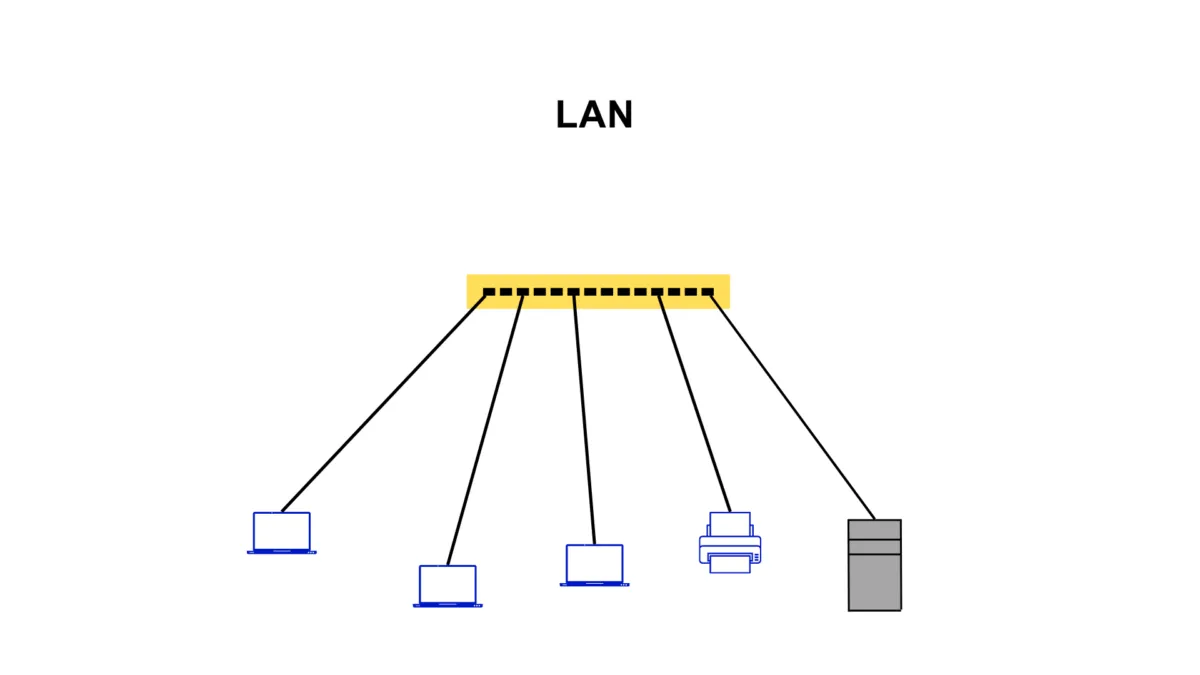
LAN, also known as Local Area Network, is a network that connects devices within a limited geographical area, such as a home, office building, school, college etc. The purpose of LAN is to allow communication and resource sharing among connected devices. Computers, printers, servers and other network devices connected and interacting with each other is an example of a Local Area network.
Some points to remember regarding LAN: –
Limited Geographical Area: Local Area network is limited to a small area. It typically covers a single building or a group of nearby buildings.
High Data Transfer Rates: LANs provide fast and high-bandwidth communication between connected devices within the network. Data transfer rates in LANs range from 10 Mbps (Ethernet) to several Gbps (Gigabit Ethernet or faster technologies).
Private Ownership: LANs are privately owned networks.
Low Latency: Since the size of a network is small and data transfer rates are usually high, the latency or delay in transmitting data is very low. Hence LAN has a quick response time.
Ease of Setup and Maintenance: LANs are easy to maintain and set up. It is usually cost-effective.
For instance: – A small company has a single office with 25 employees. They want each employee to communicate with each other and enable them to share resources allowing them to access office resources and files required for daily operations. A typical small office LAN requires the following components: –
Computers: Each employee has a desktop computer or a laptop.
Printers: Several printers are connected to the LAN, allowing all employees to print documents.
Router/Switch: The company sets up a switch to interconnect all devices within the LAN. The router is necessary if in case to allow the employee to access the internet and to allow different VLANs in a network (if exist) to talk to each other.
Server: The company may have a local server for storing shared files and resources.
Cables/Wireless: Ethernet cables or Wi-Fi access points are required to connect devices wirelessly or via wired connections.
When all these devices are connected, properly configured and able to communicate. This network is known as Local Area Network. Employees connected can easily communicate with each other by sharing files or accessing shared resources on the local server. They can also use printers to print documents directly from their computers. Each employee doesn’t need to have a separate printer. Our home network with WIFI access points, computers, and mobile phones connected can also be considered as a small Local Area Network.
What is WAN (Wide Area Network)?
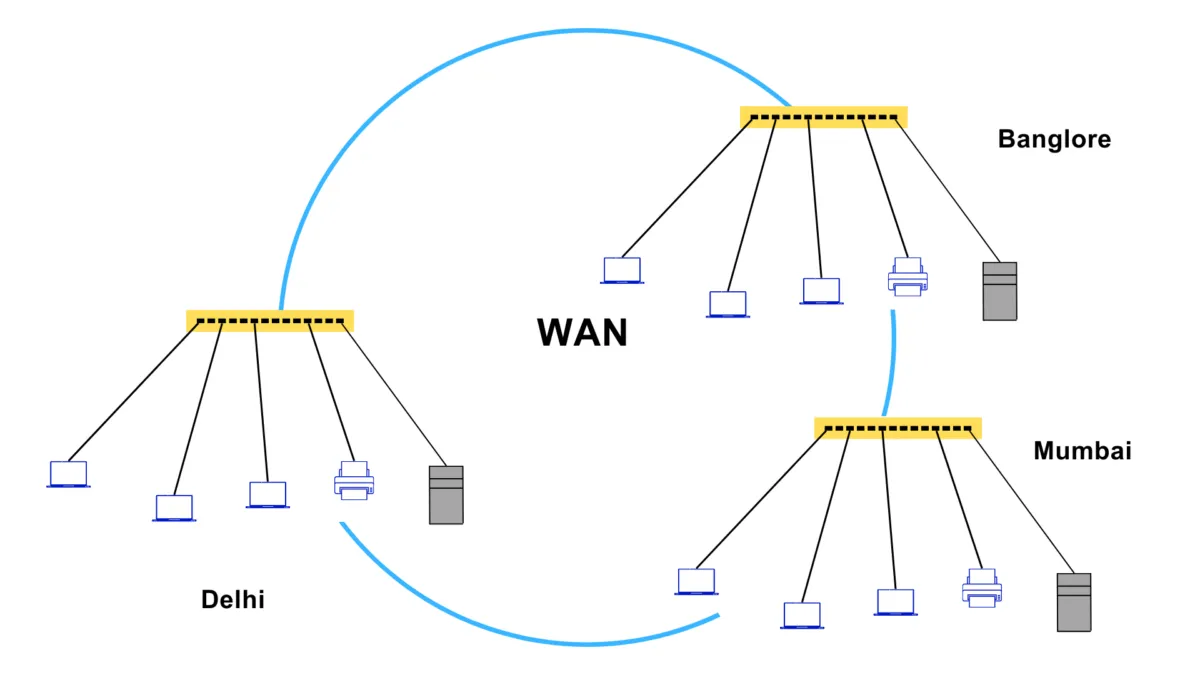
A Wide Area Network (WAN) is a type of computer network that extends over a large geographical area, typically spanning across cities, states, countries, or even continents. Unlike LANs that cover a limited local area, WANs facilitate communication between devices over long distances. WANs are used to connect multiple LANs, allowing devices in different locations to share data and resources. We can say that a LAN ends when we need an internet service provider to connect our different sites. WAN is created using VPN technology like MPLS. Some points to remember regarding WAN: –
Large Geographical Area: WANs cover vast distances, often involving multiple offices situated in different cities i.e., separated by significant physical distances.
Public or Private Ownership: WANs can be owned and operated by public telecommunication companies, internet service providers (ISPs), or private organizations.
Relatively Lower Data Transfer Rates: Compared to LANs, WANs typically have lower data transfer rates due to the longer distances. Also, with an increase in data transfer rate, cost increases significantly.
Higher Latency: Since the data transfer rate is relatively lower latency or delay in a Wide Area network is usually high.
Complex Setup and Maintenance: Maintaining and setting up a Wide Area Network is quite tough. It requires complex configurations and involves working with multiple network providers and technologies. A WAN setup requires a lot of components and it is expensive.
For instance: – The company now has grown from 25 employees to 1000 employees with offices in different cities.
Do you think that it is feasible and reasonable to establish the fibre lease line connecting each office of a company, as we connect devices in a single building, by itself? Of course not.
In such cases, ISP can help a company to connect its offices and the network that forms is known as Wide Area Network (WAN). See we are connecting LAN at different locations, and the final network established is called a Wide Area Network.
To connect the branch offices, the company takes the help of an Internet Service Provider (ISP) or telecommunication to establish WAN links between the offices. These WAN links can be dedicated leased lines, MPLS (Multiprotocol Label Switching) circuits, or VPNs (Virtual Private Networks) over the public internet. All these lines are managed by ISP itself.
Once the WAN is set up, employees in each branch office can communicate with one another as if they were on the same local network. They can share files, and get access to data saved in the central server which may be located in one of the branch offices or a data centre. In addition to these, offices may also be connected to the internet with the help of the same ISP which is providing them with a WAN link or a different ISP which allows the host in each LAN to get access to internet services.
What is the differences between LAN and WAN?

Let us concisely whatever we have discussed the differences between LAN and WAN-
LAN | WAN |
It stands for Local Area Network | It stands for Wide Area Network |
Low latency | High latency |
It is a private network | It may be private or public |
High transmission speed | Comparatively low transmission speed |
Easy to maintain | Difficult to maintain |
Cost effective | Expensive |
Used to connect devices situated under small geographical area | Used to connect devices situated under large geographical area |
Requires low infrastructure | Requires high infrastructure |
If LAN goes down, it is easy to troubleshoot | If WAN goes down, troubleshooting is difficult. |
Most of the devices used are layer 2 devices. | It uses Layer 3 devices like Router, Multilayer switch |